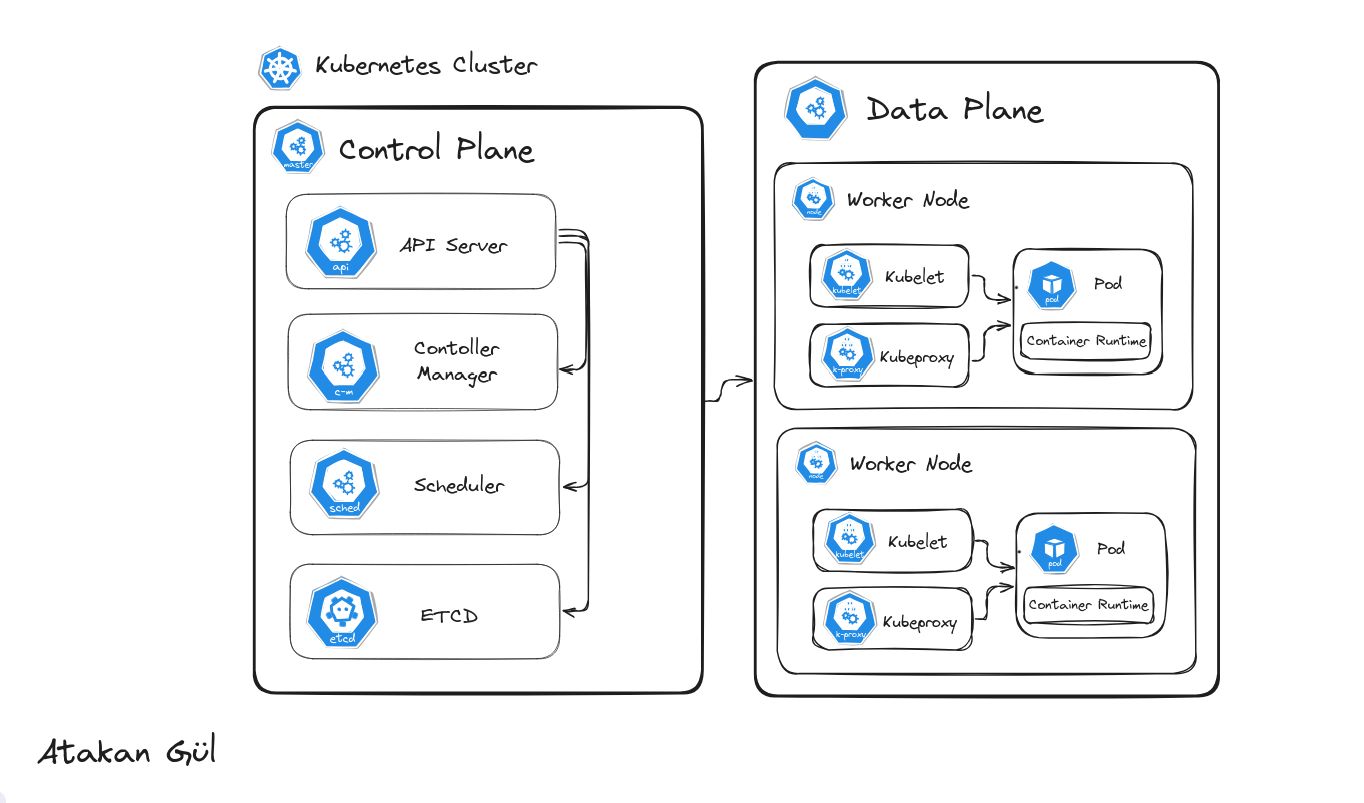
 \n\n# Kubernetes - Cluster Control Plane and Data Plane Components Explained\n\nKubernetes (short: k8s) is a container orchestration and management solution based on Google’s Borg cluster manager.\n\n> In the broader perspective, it is a network manager and an orchestrator for the processors. Manages the underlying infrastructure and network configurations for containerized services through complex configuration steps.\n\nIn this guide you will get familiar with;\n\n- K8s Architecture Overview\n - Control Plane Components\n - Data Plane Components\n- Automation of Deployments\n- The most important Thing\n\n## 1 - K8s Architecture Overview\n\nConsists of components including:\n\n1. Control Plane\n - Scheduler\n - API Server\n - Controller Manager\n - Etcd\n2. Data Plane\n - Worker Nodes\n - Pods\n\n### 1.1 Control Plane\n\nControl plane is responsible for keeping the cluster state in requested state with components. Each component has unique responsibility in contributing in state management in cluster.\n\n#### Scheduler\n\nResponsible for pod creation. As new requests come to the cluster declaring to create new pods for a specific service, the control plane receives the request and sends it to the scheduler. The scheduler then talks to the data plane and triggers pod creation.\n\n#### API Server\n\nREST API service in the control plane to retrieve cluster information. Used by control plane components and clients. Accessible via
 kubectl CLI tool or REST requests.\n\n#### Controller Manager\n\nKeeps track of health of critical cluster controllers:\n- Node Controller\n- Deployment Controller\n- ReplicaSet Controller\n- StatefulSet Controller\n- DaemonSet Controller\n- Job Controller\n- CronJob Controller\n\nIt uses a continuous loop to check controller states and restarts failed ones to maintain cluster reliability.\n\n#### Etcd\n\nA distributed key-value store that keeps track of the cluster state: deployments, node info, pod info, etc. It is crucial for recovery and backup.\n\n### 1.2 Data Plane\n\n#### Worker Nodes\n\nA worker node can be a VM or physical machine that runs cluster workloads. More nodes = more compute capacity.\n\n#### Pods\n\nSmallest deployable unit in Kubernetes. Can run one or more containers. Ephemeral by default (no persistent storage unless volumes are mounted).\n\nKubernetes offers persistent volumes for long-lived data across pods.\n\nKey components on each node:\n\n- Container Runtime: Runs containers. Examples: Docker, containerd\n- Kubelet: Runs on each node, manages pod/container lifecycle and reports to the control plane.\n- Kube-proxy: Manages network rules and service discovery/load balancing inside the cluster.\n\n## 2 - Automation of Deployments\n\nDeployments are managed via YAML files and CLI tools. These tools are critical for delivering applications to your cluster.\n\nThe cluster receives deployment requests through files like deployment.yaml that describe where the app binaries are and how they should be configured.\n\nControl plane persists this in etcd, then creates the pod.\n\nWhile this simplifies deployment logic, it does not track versions (which is critical in CI/CD).\n\n### 2.1 Helm\n\nHelm is the package manager for Kubernetes. It:\n- Keeps track of app versions via Helm repos (e.g., GitHub)\n- Wraps around kubectl\n- Simplifies deployment and rollback\n\nInstead of writing new YAML files each time, you define charts and Helm handles version tracking and deployments.\n\nFor implementation details see: Deploying application in a version controlled way.\n\n## 3 - The Most Important Thing\n\nEach Kubernetes setup is unique. Teams must be trained regularly and updates should be communicated clearly.\n\nTeam-wide understanding leads to better cluster usage, cost reduction, and higher efficiency.\n\n## Conclusion\n\n\n\nKubernetes may seem complex, but it is highly logical. It revolutionized container orchestration through its layered architecture.\n\nControl Plane and Data Plane components work together to keep the cluster healthy and functional.\n\nThe real power of Kubernetes lies in how teams use it. Regular education and documentation improve results dramatically.\n\nKubernetes evolves with your needs. Learn it, use it wisely, and let it scale with you.\n\n#### Continue Reading\n\n- Kubernetes deployments\n- Helm Overview\n- Kubernetes Monitoring\n\nIf you enjoy my posts, consider subscribing to my newsletter. Drop a comment and help me grow. Thanks for reading!
Kubernetes Control Plane and Data Plane Explained: Key Components & Automation
In this post, I break down the core components of Kubernetes' control and data planes, focusing on how it manages clusters, automates deployments, and ensures system health using tools like etcd, the API server, and Helm. It’s a straightforward look at Kubernetes architecture for anyone wanting to deepen their understanding.